business apps
 
Business Apps - CRM
 
 
Business Apps - Calendar
 
 
Business Apps - Task Management


All your contact information at the touch of a button

 
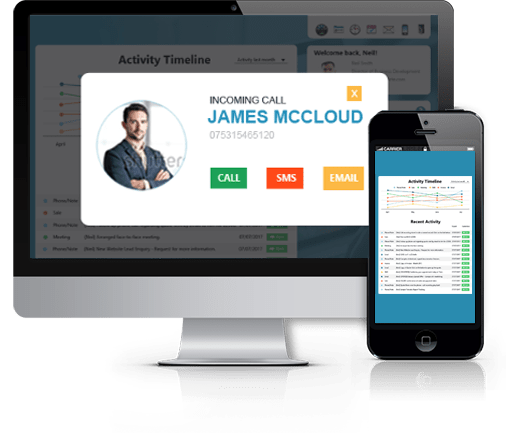
All your contact information at the touch of a button, upload photos, add important notes and detailed history of all the activity you or your team have had with any contact, view at anytime.
 

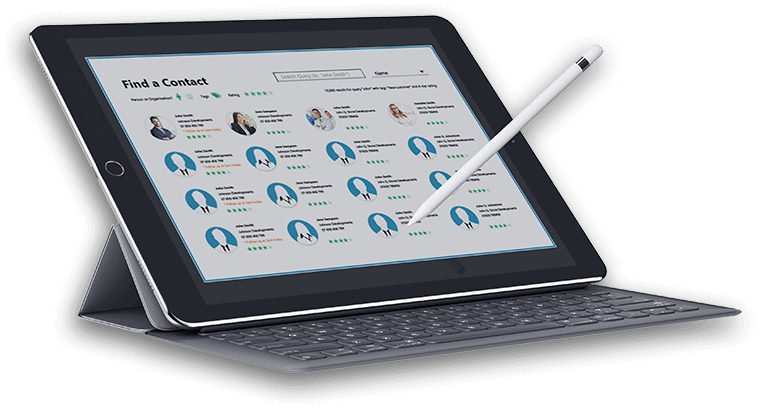
Quick search and access to contact list

 
Plan ahead using map-my-day by accessing your appointments with contact details and view it via PC, laptop or mobile. Map your tasks or your contacts or suppliers and get more done.
 

Sharing information with your team

 
Everyone in your business can access or update each client’s history, notes, via an online database so no more panics when someone is away.
 

Build better relationships

 
Keeping a record of customer birthdays, hobbies, whether they have a family etc, enables you or your team to go that extra mile by sending cards and taking an interest in their hobbies.
 

Plan your day

 
Instant overview of your tasks helps you to focus on what is priority and makes you more productive and on top of things.
 

All your calendars on one page

 
Instantly see who is doing what and when so you can prevent clashes or invite yourself to a meeting you want to attend.
 

Task summary

 
This is a great way to see where everyone is or where you are in a quick easy summary table.
 

Manage your calendars

 
This provides a view of all of your calendars and your teams and your access rights to each calendar.
 

Share calendars using rules

 
Set up rules within each of your calendars, do you want to share it with everyone in your team or just the select few?
 

Create events

 
Click on an event, set up a reminder via SMS or Email in advance so you don’t forget to attend. Invite other guests to your event via automatic email.
 

Personal tasks

 
Here you can see all of your personal tasks stored in order of priority in one central place.
 

Assign tasks

 
Keep on top of work by setting up tasks to a contact, send a reminder to yourself so that you can track and share task information with rest of your team – great if you are working on a project.
 

Manage your tasks

 
Editing a tasks allows you and your team to go into a task and update its’ progress and also check who is responsible for the task and track whether it is meeting the deadline.
 

Group your tasks

 
Create and name tabs and keep all your tasks in their relevant sections rather than all together, you will save time and everything will stay organised.
 

Track outstanding tasks

 
Track all your outstanding tasks, see how many tasks are active, when they are due or overdue. This valuable summary will keep you and your team productive.


icomplete is especially tailored for small business or sole traders who just want a simple but effective way to track communications with their partners and clients. If you have a small business, with a handful of employees and growing customer database then icomplete is for you.

Accurate information can be accessed and shared instantly

icomplete's unique CRM system stores software and telecoms together all in one place. This means that you can build up a highly comprehensive profile and history of any customer, client or contact that can be accessed by you and your team via the internet from your PC, laptop or mobile.

Store any correspondence and communications to individual contacts in a variety of formats: email, voicemail, fax to email, telephone recordings, sms messages, files, images, wave files, documents and pdfs.

A great collaboration tool for you and your team

Keep you and your team on the same page when developing a business or personal relationship with a new or existing client. An outcome of a meeting, email, telephone conversation or discussion with a client can be viewed by the team from a central base that can be accessed at any time by the whole team without interrupting the day.

Get the office support you need before a meeting

Save so much time and improve you customer relationships prior to meetings by getting up to speed with their account at the touch of a button. Simply view all the activity that has occurred over the last few months between your client, you and your team.

 
£12.00/month for all 3 Business Apps
(includes mobile access)


Your address book for life, view it anywhere at home, in office, on holiday.
Map-my-day lets you view location of your contacts or appointments at a glance.
Sharing information with your team improves communication and reduces errors.
Build better relationships with your customers and partners.
Plan your day ahead with task lists for you and your team.


Frequently asked questions...

  • What is CRM? CRM (customer relationship management) is used by many businesses to help them manage their customer relationships. For example, a business might build a database about its customers that described relationships in sufficient detail so that management, salespeople, people providing service could access shared information, match customer needs with product plans and offerings, remind customers of service requirements, know what other products a customer had purchased, and so forth.
  • Why should I buy icomplete CRM What makes us different is the way in which we join up software and telecoms together. We go one step further than other hosted CRM suppliers. You and your team can get access to documents, client history, telephone conversations (with in-build phone recording feature), voicemail, sms messages and fax to email. All this valuable information becomes a very powerful business tool when it can be shared with a team, it keep everyone up to date and more productive.
  • Is hosted CRM right for my business? Yes, we believe it is. Research shows that in-house CRM were extremely costly and complicated, now the market is embracing the hosted CRM application. icomplete’s CRM offer to SME business is affordable and less complex CRM technology and is as easy to use as Microsoft outlook and Microsoft office suite.
  • Can I import my contacts into icomplete easily? Yes, if you currently have your contacts in outlook it is very easy to import your data and will only take a few minutes following the on-screen prompts. We also support vcards so you won’t have to enter you data manually.
  • Is it easy to search down contacts? Yes, you can search within a view by the star rating factor which is easy to set up. Once you have filtered your contacts by Star rating, Name or Tag search, you can view them on a map to look for sales or marketing patterns in their locations.
  • Do you offer help desk support? Yes, we provide (FREE for subscribers) email support: support@icomplete.com

What our customers say...

“The software is very easy to understand even on first use and I really like the joined up nature of the service.

It's helping me because all my contacts are in one place now, all with profiles and a historical journal associated. I can tell you that it's a nice feeling to know you are more organised.”

Alexander Hickman, Osteopath
 

icomplete’s calendar usability

It is so easy and simple to use and has a clean, bright interface. You can create, move, edit or delete events or appointments quickly with the drag and drop mouse feature.

Single or Multiple calendars

Create single or multiple calendars for business , personal or team use. See all your calendars on one page in a clear, bright and attractive colour coded layout.

Share your schedule with colleagues, family and friends

Subscribe and view other people’s calendar, invite guests to meetings or events. They will automatically receive email notification and you can keep track of RSVP’s.

Be organised, never miss another appointment

Set up email or SMS reminders so that you will get advance warning of an up and coming event or appointment. You can also set up repeat events or appointments in advance.

View your calendar on the go

Access your diary via your mobile phone when you are out and about to ensure that you are always where you need to be and on time.

 
£12.00/month for all 3 Business Apps
(includes mobile access)


View all of your calendars on one page.
A clear overview of what activity is happening over the next few weeks.
Managing your calendars makes life so much easier.
Decide who you want to share your calendar with!
Create an event and all the detail of that event in one place.


Frequently asked questions...

  • Can I set up more than one calendar? Yes, as an individual user you can set up multiple calendars which you can access. This helps to keep you more organised and you can separate your personal information from your work but still see it all on one screen so that you don't get clashes.
  • Can I share my calendar with others? Yes, you can share your calendar with others but in order to do this you will need to set up the ‘others’ as users, each additional user will be charged at £8 per month. Additional users will have access to using the icomplete CRM (customer database), calendar and task management.
  • Can I view other calendars? Yes you can view other calendars provided you have been given access by an invitation. This ensures that the owner of the calendar has confidentiality and can choose who they wish to give permission to view their calendar.
  • Can I set up multi-calendars for my team? Yes you can. Additional users from your teamwill have access to using the icomplete CRM (customer database), calendar and task management.
  • Can I access my calendar on other devices, i.e. mobile, laptop? You can access your calendar and update it via your PC or laptop. You can view your calendar as a readme only calendar via your mobile provided it is an iphone, blackberry or windows mobile supported device.
  • Do you offer help desk support? Yes, we provide (FREE for subscribers) email support: support@icomplete.com

What our customers say...

“We've got much greater visibility of each other's activities now - at a glance I can see what's going on with colleagues or I can see my week.

It's really easy now to create a history for each patient, this will change the way we work and follow up with patients.”

Sativa Bhandari, Health Vibes
 

Get your team more involved with group goals and tasks

Communication is key and what better way than being able to share information at the touch of a button with your team. Set personal tasks and group tasks with time lines to improve performance and productivity. Set up reminders so that you and your team can keep track.

Plan your day before it starts

You can see your task list on your mobile first thing, telling you who you need to call and what you need to do for the day. It is available wherever you are, whether you are off sick, out of the office, simply log on via your mobile, laptop or PC.

Be organised and get more done

You can also set up tasks and schedule reminders via SMS or email in advance so that you don’t forget! Reminder messages help you and your team respond to your customers more quickly and keep you ahead of your competition.

Map-my-Day

Use the maps to see where your tasks are located and plan the most effective route to get things done in less time.

 
£12.00/month for all 3 Business Apps
(includes mobile access)


View your tasks ‘In tray’ at a glance.
Set and assign tasks to a contact.
Track the progress of your own or group tasks.
Customise each task to your needs.
Monitor your tasks with task summary.


Frequently asked questions...

  • Can I create my own task list and assign tasks to others? Yes, you can create an individual task list and then assign some of the tasks to others. You can also track these tasks.
  • How can I stay on top of assigned tasks? You can set up email or sms reminders so that you stay on top of your to-do-list.
  • Can I access my tasks from my other devices? Yes, you can access your task list via a laptop, iphone, blackberry or any other windows mobile device.
  • Do you offer help desk support? Yes, we provide (FREE for subscribers) email support: support@icomplete.com

What our customers say...

“One plumber who has taken advantage of the icomplete.com service is Yen-Lin Chong of www.londonplumber.biz.

icomplete’s solution enables him to receive text messages with appointments and job briefs to keep him organised and on top of things.

Yen-Lin was amazed at the complete solution and pleasantly surprised that the set-up was so simple and quick. The service has given him efficiency and billable hours back. ”

Yen-Lin Chong, www.londonplumber.biz